Clearing the Path
to First Findings
Meeting AppSec Teams Where They Are
Built a new onboarding experience for StackHawk, giving AppSec teams a clear path to their first security findings.
Phase 1 shipped · Phase 2 in progress
Client
StackHawk
Role
Lead Product Designer
Category
Product Design
Team
Cross-functional
Duration
January to March 2026 (Phase 1)
A drop
in trial-to-paid conversion prompted the initiative
2 new features
configure authentication without YAML or their app's headers
1 flow redesigned
smoother onboarding no matter how users chose to configure or scan
I led design for StackHawk's Q1 2026 headline initiative. I sat in on every customer call, tracked sessions in Sentry, iterated directly in code with engineers, and took feedback straight to the team.
AppSec teams could finally run scans and see real findings in minutes without needing YAML expertise or Docker installed. The flow removed the technical barriers that had been blocking teams from ever seeing value. Our product was powerful but required too much technical setup to demonstrate that during a POV. This initiative changed that.
The Problem
AppSec teams evaluating StackHawk were struggling to get started. The product was powerful, but the path to seeing that was too long and too technical.
Other tools in the space let users enter a URL and see results immediately. We had built a hosted scanner with similar capabilities, but it wasn't part of our main flow into the product.
The core issue was that our POV process required downloading our scanner, understanding how it works, configuring YAML, and setting up authentication. Authentication alone was a huge barrier. For our target users, it was a non-starter.
The goal was for every customer to shift left and scan in their CI/CD pipelines. But to get there, they needed to believe the product worked first. I believed a simpler onboarding process could be the bridge, proving value fast so teams would invest in deeper integration.
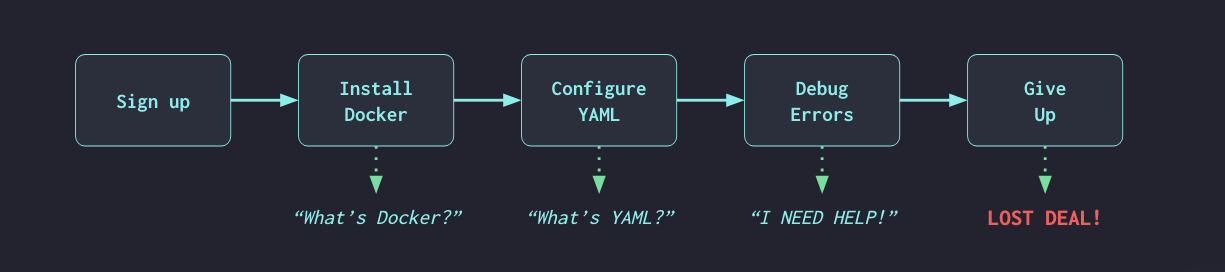
The old onboarding experience from a trial user’s perspective
Problem Statement
AppSec analysts and engineers need an easy way to onboard with StackHawk and then scale their security program from there. They may not have the technical knowledge to configure YAML, set up Docker, or navigate CI/CD pipelines. They need to run scans and see results without getting stuck.
The Hypothesis
Use a cloud scanner as the entry point. Enter a URL, StackHawk runs the scan on our infrastructure. No download, no terminal, no engineering required. Get them to findings first, then earn the right to ask for anything else.
Stage 1
Enter a URL
Cloud scanner runs on our infrastructure. No download, no terminal, no engineering ticket.
Stage 2
Configure for better results
Form-based setup, no YAML required. Wider, deeper coverage without technical prerequisites.
Stage 3
Get to automation
Guide them to the CLI and CI/CD pipeline. A full AppSec program, on their terms.
The original path required an engineer. The new path required a URL.
Target Users
I designed this flow for AppSec Analysts evaluating security tools. These are the people increasingly responsible for championing and selecting tools, but they lack the technical depth to configure scanners themselves.
From our Solutions Architects who run POVs daily, I kept hearing the same things. Users can't get the scanner working without pulling in an engineer. POVs fade out because setup complexity blocks value demonstration. Teams want simple endpoint-based DAST where they can enter a URL and get findings. Users are reluctant to start with API Discovery because there's no immediate value.
Persona: AppSec Analyst
Role
AppSec Analyst
Context
Owns the AppSec program. Evaluating security tools for their team, often championing and selecting the tooling. Responsible for scaling security coverage over time.
Goals
Get started fast, run scans, see findings, triage results, prove the tool works to stakeholders, then scale their security program from there.
Frustrations
Can't get scanners working without pulling in an engineer. Doesn't know YAML, Docker, or CI/CD. POVs stall because setup is too complex.
What they need
Enter a URL and get results. Simple, obvious, no technical prerequisites.
The Process
I started by journey mapping the experience end to end to understand exactly where users were dropping out and why, then iterated from there.
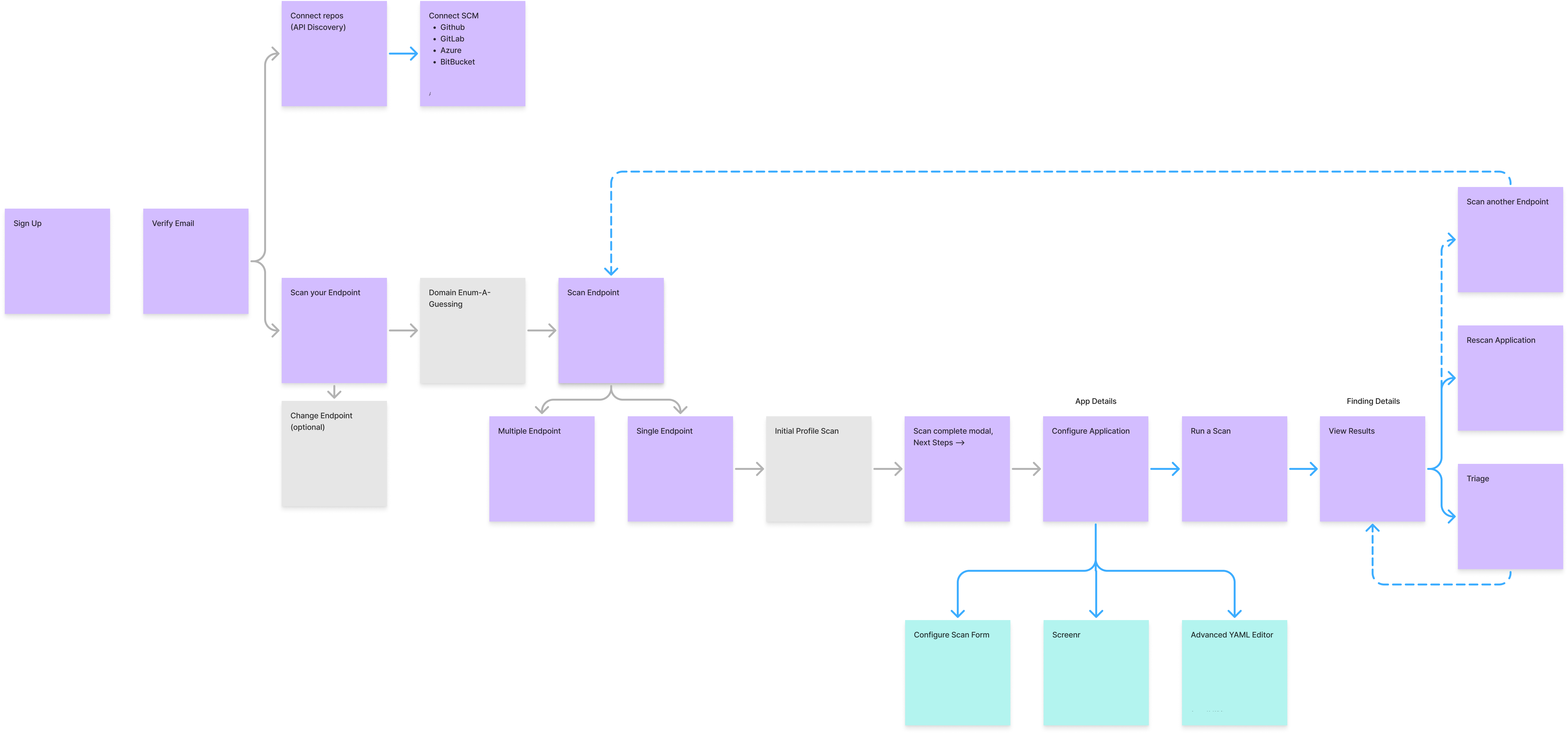
User journey map for the new onboarding flow · Click to enlarge
First Prototype and Leadership Feedback
I presented my first prototype to leadership and our new board member in person. The feedback shaped everything that came next. They wanted more positive reinforcement, celebrating what the platform just did for the user. More opinionated actions, showing the next step instead of presenting options. Make it obvious so users don't have to figure out what to do.
This was a fundamental shift in how we guide users through the product. That feedback pushed me to build on what I'd started. The Applications and Oversight screens evolved from presenting data to being deliberate about what comes next, what to fix first, and providing one clear path forward.
Coordinating Four Workstreams
This initiative touched four engineering workstreams at once, spanning automated authentication capture, cloud deployment improvements, signup flow changes, and our domain guesser service.
My role was building screens quickly to unblock engineering, ensuring visual and interaction consistency across workstreams, and maintaining the north star user experience while each team executed their piece.
Keeping the Team Grounded
Our product is deeply technical. Our engineers think like engineers, which is exactly what you want when building a security scanner. But we were designing for AppSec Analysts, not engineers.
When discussions drifted toward technical possibilities, I'd ask whether an AppSec Analyst who can't get Docker working would know what to do with what we were proposing. The engineering ideas weren't wrong. But clever and powerful isn't what this user needs. They need simple and obvious.
The Experiment
I built the hypothesis into the product. New users entered a URL, StackHawk ran a cloud scan on our infrastructure, and they saw real findings without a download or terminal. But the forced path had edges.
What worked
From sign-up to findings in minutes
Users with a publicly reachable URL could go from sign-up to findings in minutes. The cloud scanner made the product feel immediate and accessible.
Where it hit a wall
The forced path left some users stuck
Some users had no publicly reachable URL. Others needed to scan an API, which the cloud scanner couldn't handle. They had no way forward.
Key Decisions
From Optimize Scan to Run Scan
Originally, Optimize Scan was the only prominent call to action on the App screen. The idea was that configuration (adding authentication, adding a spec) unlocks better scan results, so the UX should guide users there first. Running a scan without optimizing was possible but de-emphasized.
The data told a different story. Users were clicking Optimize Scan, landing in the scan configuration panel, and then closing out without running a scan or filling out the forms. The configuration step I'd designed as a guide was actually becoming a barrier.
I made Run Scan the primary button, with Optimize Scan still available. The goal wasn't to remove optimization, it was to get users to run something first. A base scan shows the product working. Once they see findings, adding authentication or an API spec becomes an obvious way to get more out of it. Configuration as an upgrade path, not a prerequisite.
Configuration as an Unlock
After the first scan, users land in App Details. This is where configuration happens, but only after they've seen value. Add authentication to scan protected paths, add an API spec for better coverage, run again to see more findings. Configuration becomes the way to get more out of the product, not a gate blocking any value.
I streamlined the configuration experience to match. Visual form as the default, not YAML. Advanced YAML still available for power users, but de-emphasized. For the first pass, the visual form gave AppSec Analysts a straightforward way to configure authentication without needing to know headers.
For publicly reachable apps, Flight Path went further. Users log in to their app once and the platform records and replays the authentication automatically, building the configuration for them. No headers, no YAML, no manual setup required.
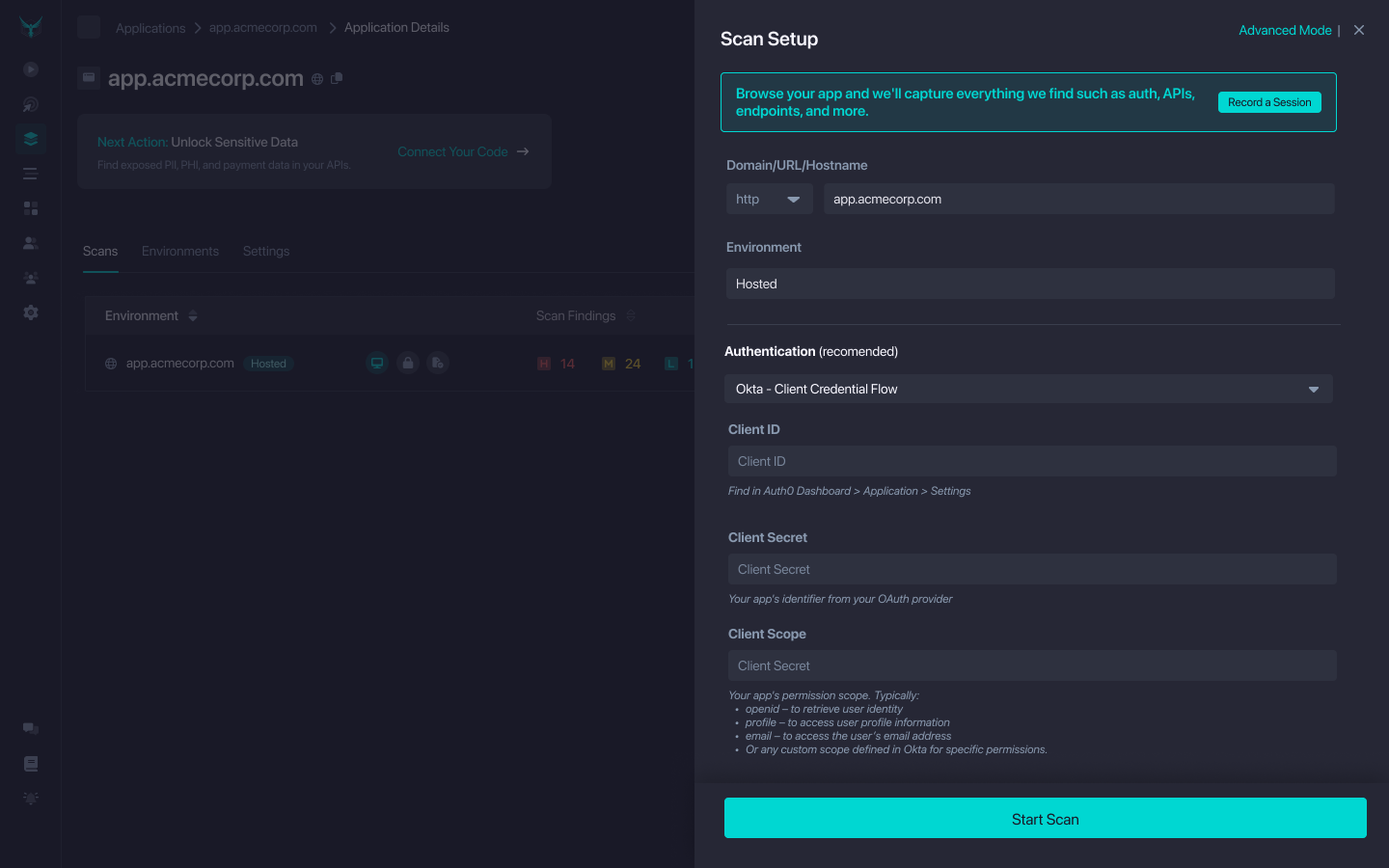
What Customers Showed Us
Once the new flow was live, I started demoing it on customer calls alongside our Solutions Architects. The reactions told us something we hadn't expected. The cloud deployment flow was solid, but what got people excited were two features we'd built to support it: a tool that records and replays authentication automatically, and the form-based configuration panel.
The automated auth capture landed the hardest. One customer called it "the dream." Customers saw it speeding up their AppSec program rollout because configuration was created for them, not by them. They also saw it getting developers to actually test more, since the barrier to adding authentication was gone. The form-based config panel got its own reaction. Our Solutions Architect wanted it in the mainstream product, not just the onboarding flow.
The insight was clear, features beyond cloud deployment could help customers onboard and reach their goals, regardless of their role. We were taking tasks that were complicated or felt like toil and doing them for users. That principle applied to AppSec Analysts running their first scan and to engineers adding their tenth application.
On cloud scanning itself, the picture was more nuanced. Customers appreciated it as a bridge, but many had a preferred path already and potential customers in POVs weren't sure yet which approach was right for them. Forcing that decision at the start of onboarding was the wrong call.
Key Insight
Automated auth capture and form-based configuration weren't just onboarding features. Customers wanted them everywhere. They made scans easier to set up, security programs faster to roll out, and time to first scan shorter.
The Learning
I was asking users to decide how to scan before they had a chance to understand their options. The scan decision belongs at the end, not the beginning.
Before
After
Cloud scanning is a great bridge. But it’s not where the decision should live. Give users the information they need first, then let them choose.
Results
Phase 1 shipped in late February 2026. App creation rates increased, an early signal that the flow was getting people to value faster. But scanning rates hadn't followed at the same rate.
I think the scan configuration step was either intimidating for trial users without a guided demo, or users didn't realize they could run a base scan without filling anything out. That gap pointed to what needed to happen next.
What I Built
I stopped forcing a path. I redesigned the Add an App experience as a single flow where every decision happens in the right order and users choose based on what’s right for their app and their team.
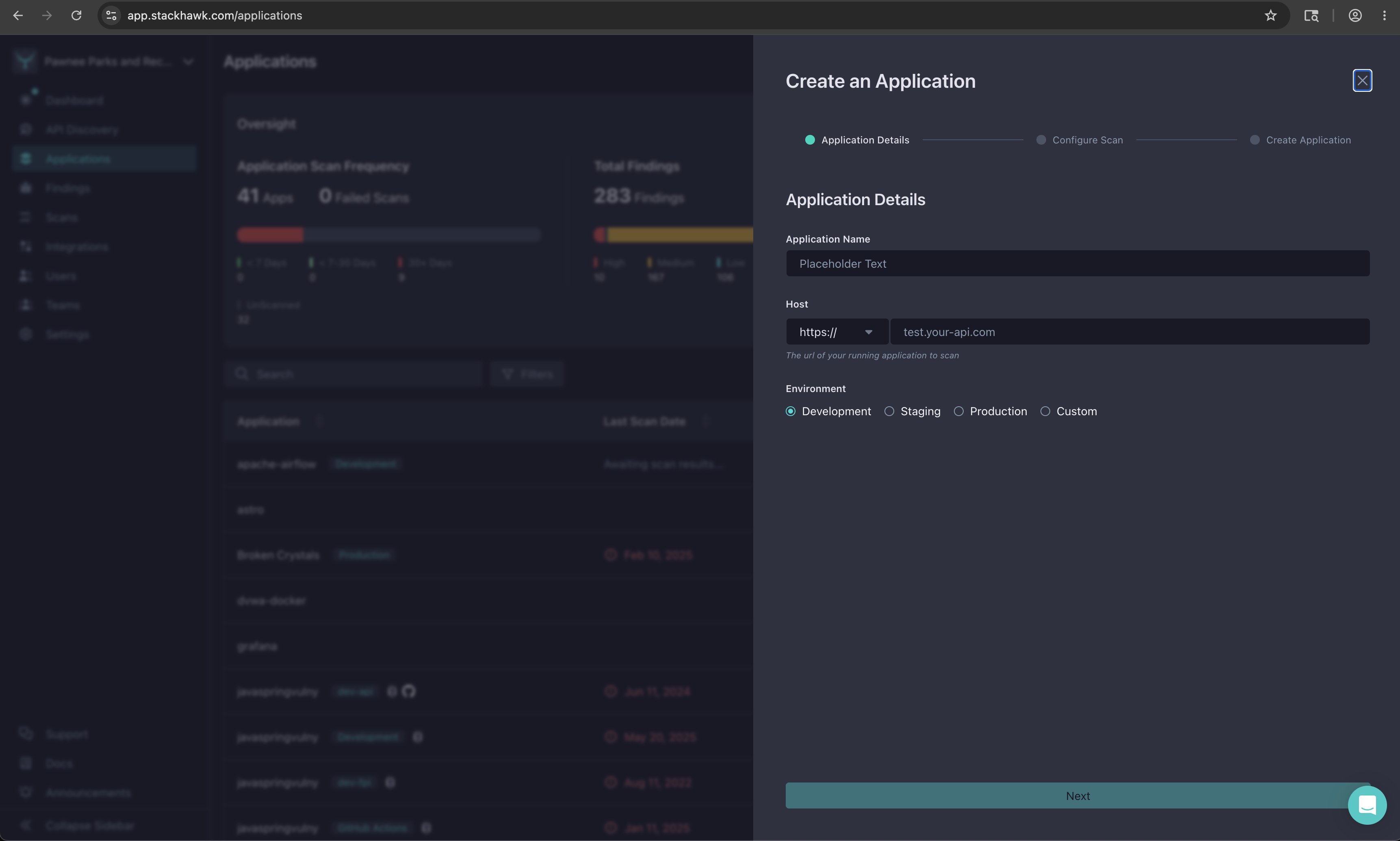
Step 1 · Application Details
Learnings
Talking to customers changed the scope.What started as an onboarding initiative evolved into features that helped our entire user base. Demoing the new flow on customer calls showed us that the things we'd built to simplify onboarding, like form-based configuration and automated auth capture, were things every user wanted. That was the biggest learning from shipping this.
It took eight iterations to find the essential flow.The early versions tried to surface everything the platform could do. It took cutting domain enumeration, decision screens, and upfront configuration to find the version that actually worked for our users.
A POV has one job.Prove the product works and that the user can get started. I kept adding features that were impressive but irrelevant to that goal. Every time I cut something, the flow got better.
Forcing a path creates friction for users on a different one.The MVP routed everyone through cloud scanning. It worked for users with a publicly reachable URL and left everyone else stuck with no way forward. Removing the forced path and letting users choose removed a whole category of problems.
Configuration is an unlock, not a gate.My bet is that letting users see value before asking them to configure anything changes how they move through the product. If they've already seen findings, configuration feels like a next step instead of a barrier.
Next Steps
With the experiment shipped and the redesigned flow in progress, there was more work ahead before I was laid off.
- Scanning experiment. Data showed app creation increased but scanning didn't follow at the same rate. I was testing targeted interventions, including Run Scan buttons in key surfaces and a modal for users who close scan config, to bridge the gap between creating an app and running a first scan.
- Connecting subdomain enumeration with API Discovery. These two features are similar and intertwined. Subdomain enumeration discovers your attack surface from DNS and TLS. API Discovery finds it from your source code. We needed to figure out how these worked together and where each fit in the user journey.
- Path from cloud deployment to shifting left. Once a user ran their first cloud deployment and saw value, how would we guide them toward Discovery or scanning in their CI/CD? The goal was to meet them where they were, then help them mature their security program when they were ready.