From Hours of Call Reviews to Instant Insights
Building an Internal AI Tool from Scratch
Designed and built an AI-powered customer research tool that turns hours of Gong research into detailed analysis in minutes.
Client
Internal Tool
Role
Lead Product Designer
Category
Design + Development
Team
Christina Bazydlo, Aaron (Head of Product)
Year
2025
3 hrs to 5 min
Research and analysis time
97%
Time reduction per analysis
Custom
User-defined analysis parameters
Impact
This tool fundamentally changed how I approach UX research. It's not just the time saved. The analysis surfaces patterns and connections across calls that I might not have made myself, and it delivers them in minutes. I can go from a question to an actionable report almost immediately, which means I can move on decisions faster.
When colleagues in Customer Success saw the tool, they immediately saw applications for their own work. What started as a personal research tool has clear potential beyond product. At a small startup, tools that help the team work more efficiently have real impact.
The Problem
I'm the sole product designer at StackHawk, and I own UX research as well. I appreciate wearing both hats because it helps me deeply understand the problems and pain points our customers are facing.
Problem Statement
I needed a way to search Gong across all customers by keyword and analyze findings by my own parameters. Gong's AI only allowed analysis by individual customer, and manual extraction was too time-consuming.
I was in the middle of redesigning our API Discovery experience and needed direct insight into what customers were saying. The only option was to search Gong by keyword, listen to each call individually, and manually extract the relevant insights. The process was time-consuming and inefficient.
Gong does have AI capabilities, but they only operate at the individual customer level. I needed to analyze patterns across our entire customer base. A colleague in Support shared the same frustration. We kept coming back to the same question: there has to be a better way to do this.
The Process
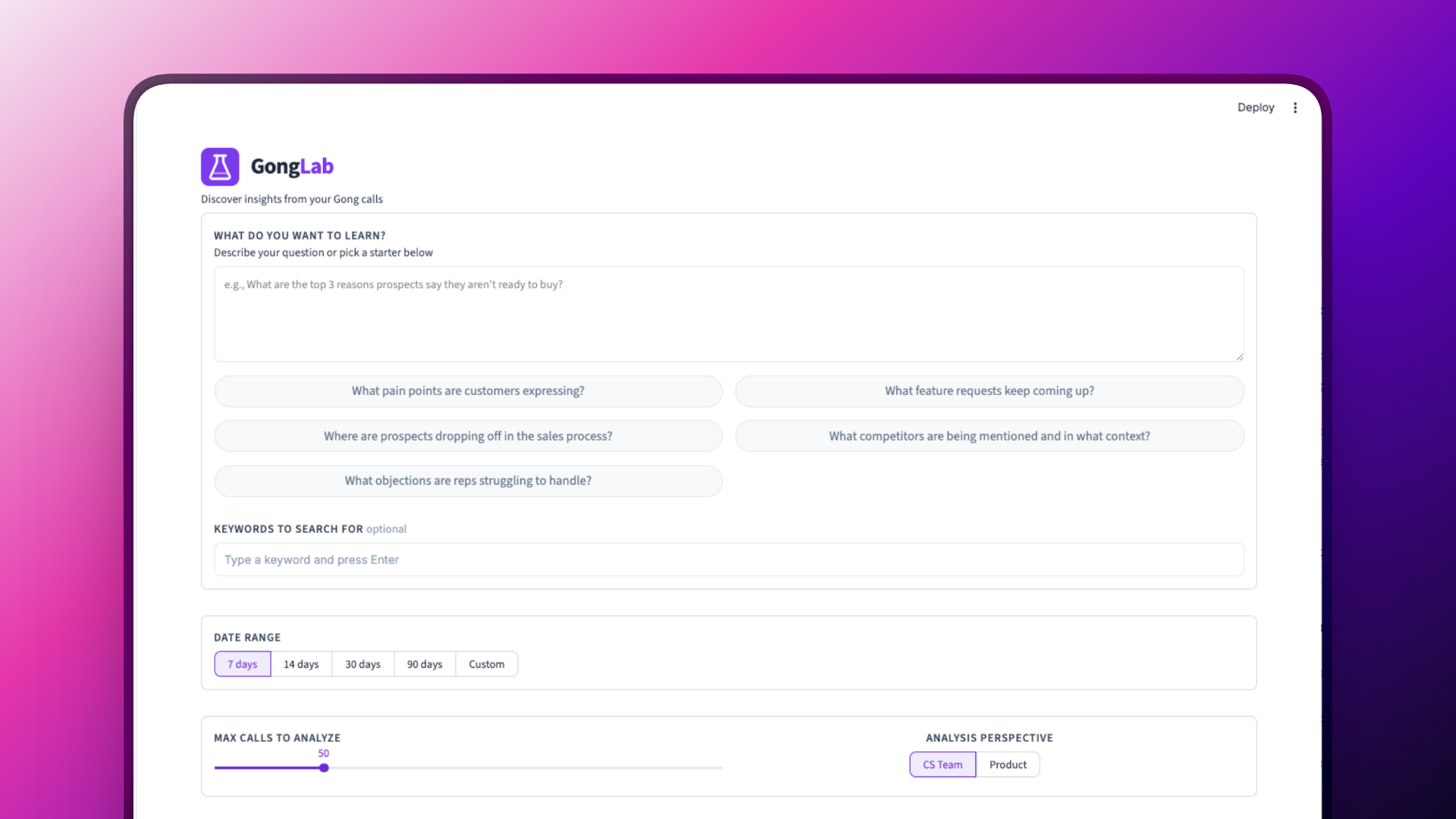
I used Claude Code to build an application I call Gong Lab. It searches by keyword across all of our Gong transcripts and generates a report based on specific criteria I define.
An engineer helped me configure the API keys and authentication so the app could connect to Gong and retrieve transcripts. From there, I worked with Claude Code to create agents that pull the relevant data and analyze it according to the parameters I set.
Why browser-based: Claude Code initially created a terminal-based app, but I pushed for a browser interface instead. I had my Customer Success colleagues in mind as potential users, and I knew they'd be intimidated opening a terminal. A browser felt more approachable for non-technical team members and made the output easier to read and share.
Debugging the unknown: Getting the first analysis to run wasn't smooth. I hit multiple errors and had to debug the app several times. I opened a debug window, fed Claude Code the errors, and worked through each issue until it finally worked. This was part of the learning process of building something outside my usual skillset.
Bringing in a collaborator:Once the tool proved its value, I brought in Aaron, our head of product who has an engineering background. Together we applied a UI kit for a more polished look, refactored the app for stability, added a dedicated reports section for storing past analyses, and organized the main page with tabs. I build the proof of concept and validate the need. Then I collaborate to make it something the team actually wants to use every day.
Key Decisions
Start with my own needs: The first version didn't have role-based presets at all. I built it purely for myself, creating a report structure based on what I wanted to know as a product designer. Only after it worked for me did I think about expanding it.
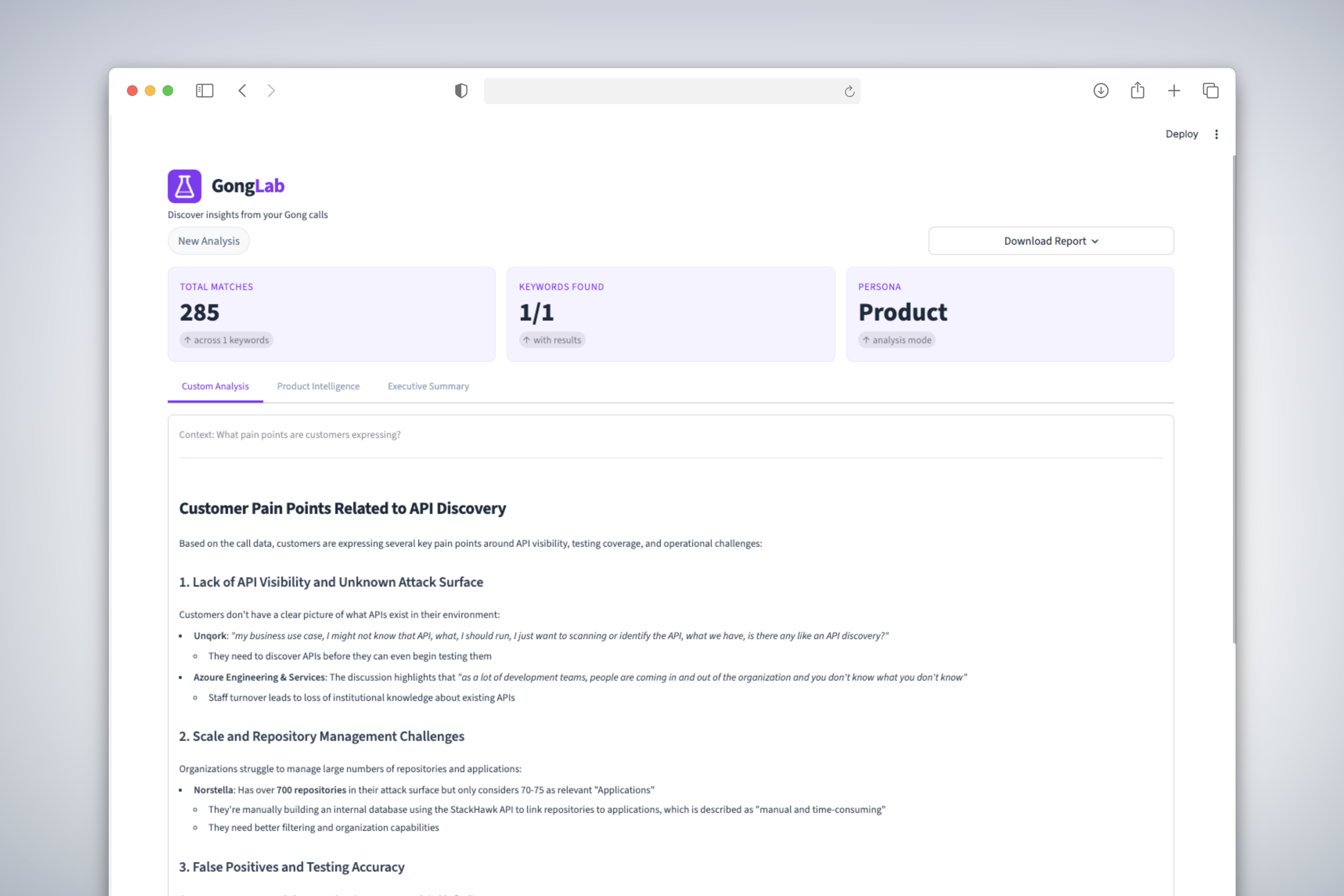
From presets to open-ended analysis:Early versions had fixed role-based presets. As I used it more, I found they were too rigid. Now the tool offers three focused report types: a product analysis for roadmap decisions, an exec summary with quotes and sentiment for leadership, and a customer analysis for CS. There's also a custom mode where users describe what they want to learn in plain language. That flexibility made it far more useful across different roles and use cases.
Reports that drive action:The reports don't just save time searching. They surface patterns across calls, group related findings, pull out representative quotes, and give prioritized recommendations. The tool does analysis I might not have done myself, making connections across dozens of calls that would be easy to miss. We added a dedicated reports section so past analyses are saved and easy to revisit, and tabbed the main analysis screen so users can move between running new analyses and reviewing previous ones.
Downloadable reports:Reports can be downloaded as either PDF or markdown. This wasn't arbitrary. I use markdown files as context files for problem-solving in Claude Code, and I share them with engineers to give them background on design decisions and user research. PDF makes it easy to share with anyone. Having both options means the output fits into however someone already works.
Ship, then refine:The first version was rough, but it worked. That was the point. Once it proved its value, Aaron and I refined it together: a polished UI, a tabbed layout on the main page, and a reports section for revisiting past analyses. It went from a prototype to something that feels like a real product. Getting something working into people's hands first, then investing in making it better, is how I think about building.
Learnings
My approach to AI is practical. If the tool I need doesn't exist, I'll create it. I'm a designer, but I'm also a builder. I don't see a barrier between what I do and what would traditionally fall into an engineer's lane. AI makes that possible, and I intend to keep using it that way.
I also learned that sometimes the fastest path to clarity is building. I had the problem defined because it was my own problem. I could have taken a more traditional route with journey mapping and other prep work, but I was excited to build. Whether that was the right or wrong approach, it was a great way to learn, iterate, and refine. When Aaron tried it, he saw the potential, dug into the code, and used Claude to refactor it into something more solid. I had Claude document everything he did and created an app audit file that captures the architecture, patterns, and decisions. Now I can apply that file to any Claude session when I'm building something new. It turned one collaboration into a reusable foundation.
Next Steps
The core tool is stable and in use. Here's where it's heading next:
- Deeper integrations: Connect analysis outputs to tools the team already lives in, like Notion and Slack, so insights surface where decisions happen.
- Scheduled analyses: Set up recurring reports that run automatically, so the team gets fresh insights without anyone manually triggering a run.