Hosted Scanner
Fast, Familiar Scanning for AppSec Teams
Led the design of Hosted Scanner, making it easy for AppSec teams to scan legacy and compliance apps on StackHawk's infrastructure.
Client
StackHawk
Category
Product Design
Team
Head of Product & Design, PM, Back-end Engineer
Duration
6-week design + build cycle
6 weeks
Design to launch
Day-one
Scanning for new customers
New market
Enterprise expansion
Impact
What it meant for users: AppSec teams could finally run scans without needing YAML expertise or pipeline access. The flow from setup to results was fast and guided. The UI felt familiar to existing StackHawk customers but was approachable enough for new users to get started without friction.
What it meant for the business: Hosted Scanner expanded our reach to enterprise customers who'd been blocked by legacy or compliance requirements. It created a new way for teams to get started with StackHawk even if they weren't ready to shift left yet. It also helped us compete against vendors who only offered hosted scanners, which we'd been losing deals to.
For enterprise customers already using StackHawk, it became a secondary capability that supplemented their pipeline-first workflows rather than replacing them. This was important because it showed we could meet teams where they were without abandoning our core approach.
The Problem
StackHawk is a developer-first application security platform that helps teams find and fix vulnerabilities fast. The core product was built for developers to run scans locally or in their CI/CD pipelines. But we kept hearing from enterprise AppSec teams who wanted an additional capability for specific scenarios: legacy systems, acquisitions, and compliance-driven production apps that didn't fit cleanly into developer workflows.
Problem Statement
Enterprise AppSec teams need a way to scan applications they don't control, like legacy systems and acquired apps, because these situations prevent them from setting up scans locally or in their CI/CD.
Customer discovery showed that many enterprise teams wanted StackHawk but were blocked by pipeline integration or YAML configuration. They just needed a way to enter a URL, verify ownership, and run a scan for compliance or legacy systems. We were also losing deals to tools that only offered hosted scanning because pressing a button was easier than our setup process.
Target Users
We designed Hosted Scanner for two groups of enterprise AppSec professionals: current StackHawk customers who need this capability alongside their existing pipeline scans, and teams evaluating StackHawk who need hosted scanning in addition to our DAST testing.
Both groups face similar challenges. They need to scan legacy systems or acquired applications they didn't build, run compliance checks on production environments, or get started quickly before pipeline integration is ready. These are security professionals who know what needs to be scanned but don't necessarily have access to source code or developer workflows.
The Process
User Flow Diagram: I mapped out the end-to-end flow to understand what users needed to do at each stage, from signup through scanning to viewing results. After reviewing the diagram with my team lead and engineers, I discovered gaps in my understanding. DNS verification isn't immediate. YAML configuration was missing entirely from my map, and I needed to figure out where it fit and how users would access it to make edits. Purchasing scan hours had to go through our finance department rather than self-serve in the app. Mapping the flow didn't just organize what I knew, it revealed holes I needed to address before I started working on screens.
Design & Instructional UI: I added a Getting Started page that walked users through what would happen, linked to documentation, and let them start a scan right away. I also designed a lighter weight version of the UI so existing customers would feel comfortable while new users could begin easily. The hosted config editor was the centerpiece, letting users adjust configurations while we handled the hosting and verification in the background.
Testing & Iteration: We ran internal bug bashes to work out the kinks and catch issues we'd missed. I created a clickable prototype in Figma for the CS team to use during POVs and health checks. I met with them to walk through how the prototype worked and how Hosted Scanner functioned.
Customers got excited about it, but the sessions also revealed concerns around DNS verification that led us to explore alternative methods. The most consistent feedback we heard was that Hosted Scanner felt too separate. Customers wanted their oversight dashboard to reflect hosted scans alongside their CI/CD results.
Technical Architecture Collaboration: I worked with engineering to align the design with the technical requirements for DNS verification and hosted config management. This way, the instructions stayed accurate but still felt clear and approachable.
Key Decisions
The solution centered on making hosted scanning feel straightforward instead of overwhelming. Through prototyping and testing, I figured out where the real friction points were and designed around them.
Getting Started page: Early prototypes showed that dropping users into an "Add a Target" screen with no context was confusing. I created a Getting Started page that explained what would happen next, linked to helpful documentation, and gave them a clear first step.
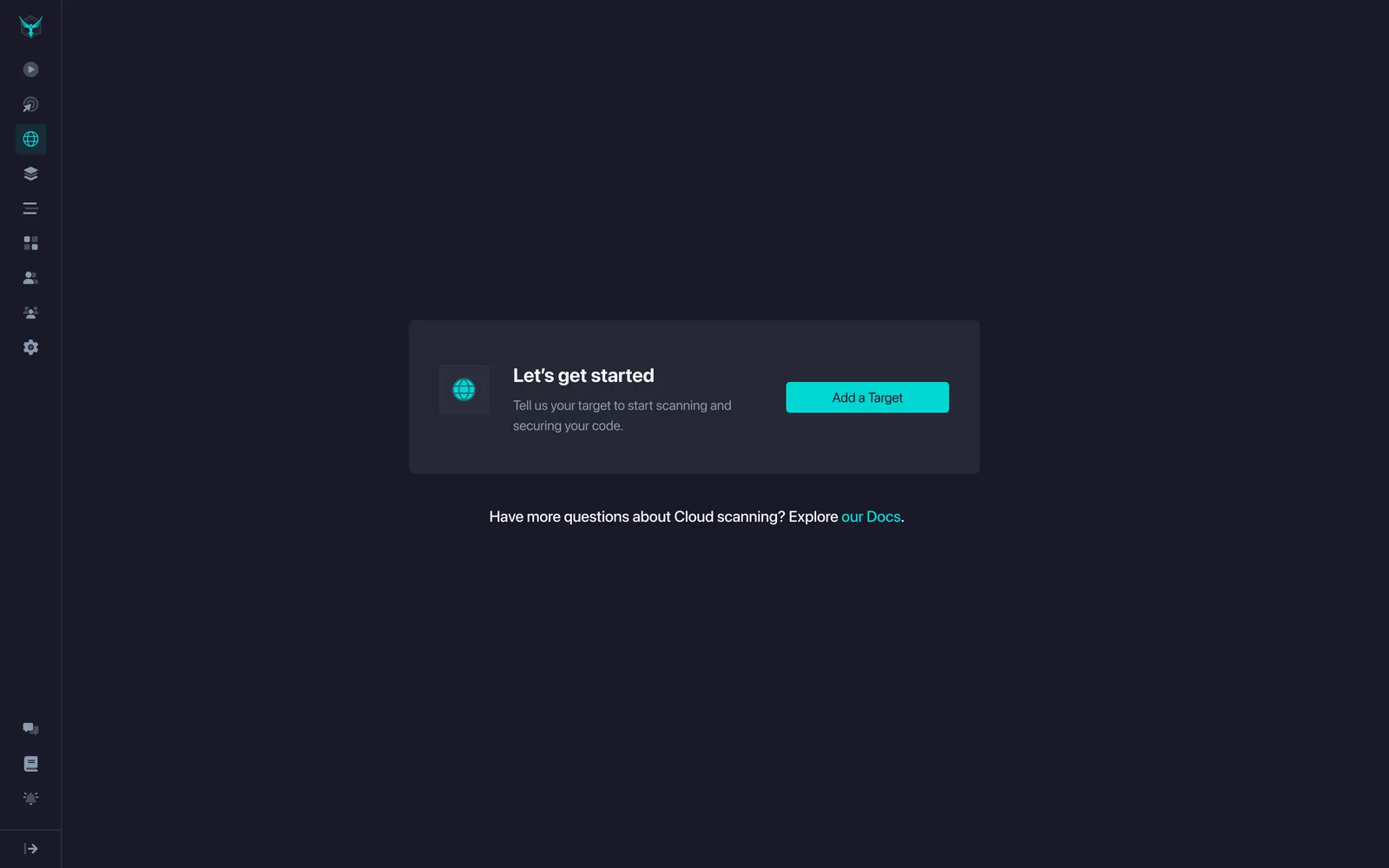
Before: Users landed on an empty screen with no guidance
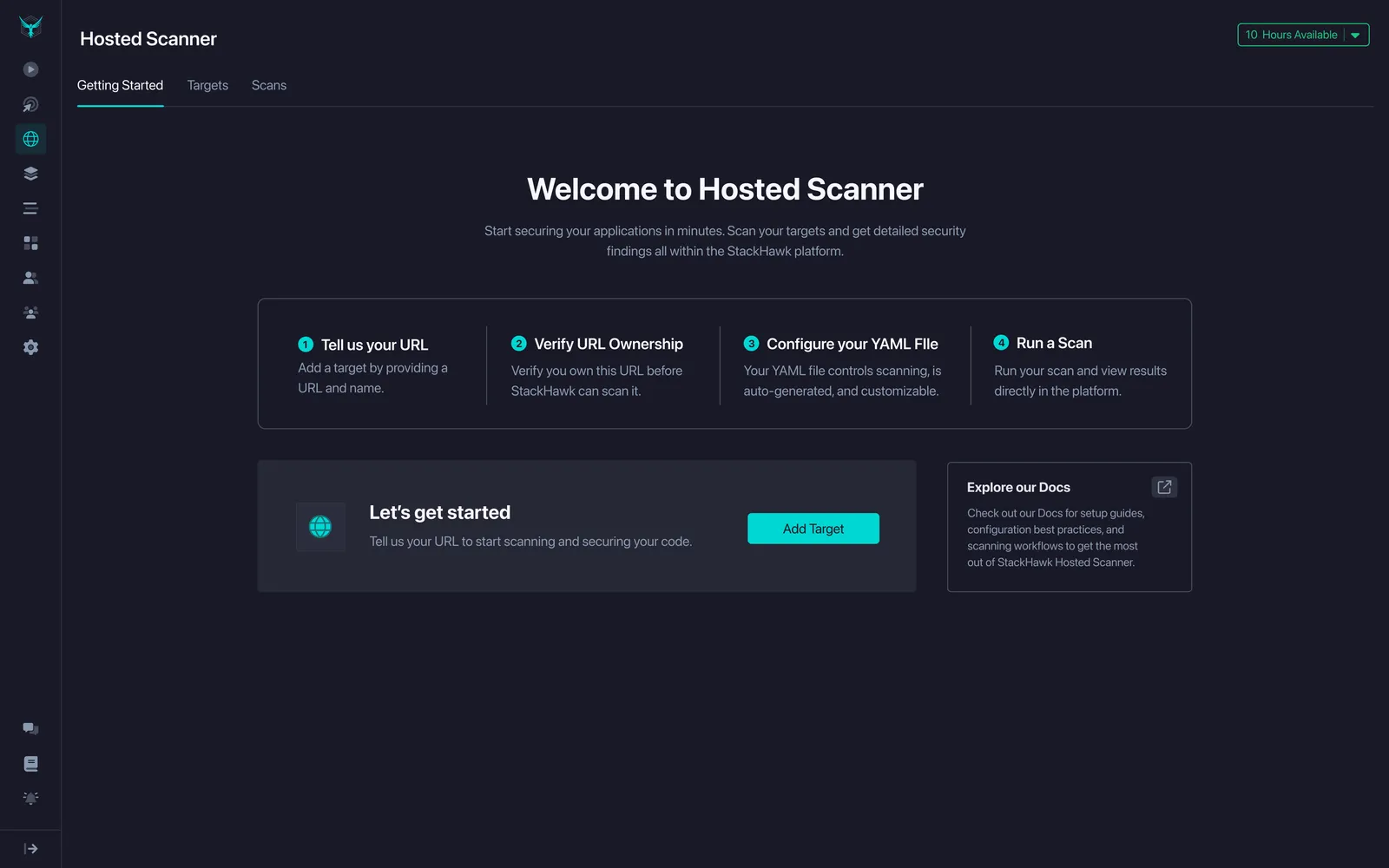
After: A guided Getting Started page with clear next steps
Clearer DNS verification: I worked with engineering to simplify the DNS instructions and added an expandable tooltip to help users through the trickiest part of setup. We also broke out the DNS entries into separate fields to make it clear these were three distinct records that might not go in the same place.
Making config editing visible: I surfaced the hosted config button onto the target screen right next to the scan button, so it felt like a core action instead of something buried in the interface.
Learnings
Hosted Scanner as an onboarding tool: This was the biggest takeaway. We heard from customers that if this feature had existed when they first started with StackHawk, they could've begun scanning immediately while their pipelines were still being set up. This insight fed directly into other feedback about wanting combined scan results, and shaped our roadmap for what we're building next.
DNS verification isn't always straightforward: While DNS verification works fine for some teams, others told us that adding DNS records can be really difficult within their organizations. This feedback is now pushing us to explore alternative verification methods that might be easier for more customers.
How we talk about this matters: Some customers worried that Hosted Scanner might replace our pipeline-first approach. We realized positioning is everything. We need to be clear that this is a bridge for specific scenarios, not a replacement for how StackHawk is meant to be used.
First-time vs. returning experience: The Getting Started page works well for first-time users, but it's not the right experience for people coming back. This is something we'll need to rethink as usage grows.
What We're Building Now
Customers told us they want to see their Hosted Scanner results alongside their CI/CD scan results. We're actively working on merging them into a unified experience so customers can see everything in one screen.
Next Steps
- Unified scan results: We're merging Hosted Scanner results with CI/CD scan results into a single view. This means customers will no longer have to switch between two separate experiences to understand their full security picture. The goal is to make Hosted Scanner feel like a natural extension of the platform, not a separate product.
- Onboarding with baseline scanning: We are planning on adding Hosted Scanner as an alternative path in onboarding for customers who want a baseline scan before diving into Discovery. We provide a default YAML file so new customers can run their first scan immediately and configure it after. This removes the biggest barrier to getting started and gives teams something actionable on day one. From there, they can layer in scan configuration, CI/CD scanning, and API Discovery as they mature.
- Better config editing: Enhancing the hosted config editor to give users more flexibility and reduce friction during setup.
- AI assistance: Exploring an AI chat feature to help with YAML configuration. This could be a game changer for AppSec professionals who aren't familiar with YAML syntax.